Free Windows Beta
Rebuild missing audio tracks from the matching picture edits in your AAF.
Download AAF Voodoo 0.9 Beta
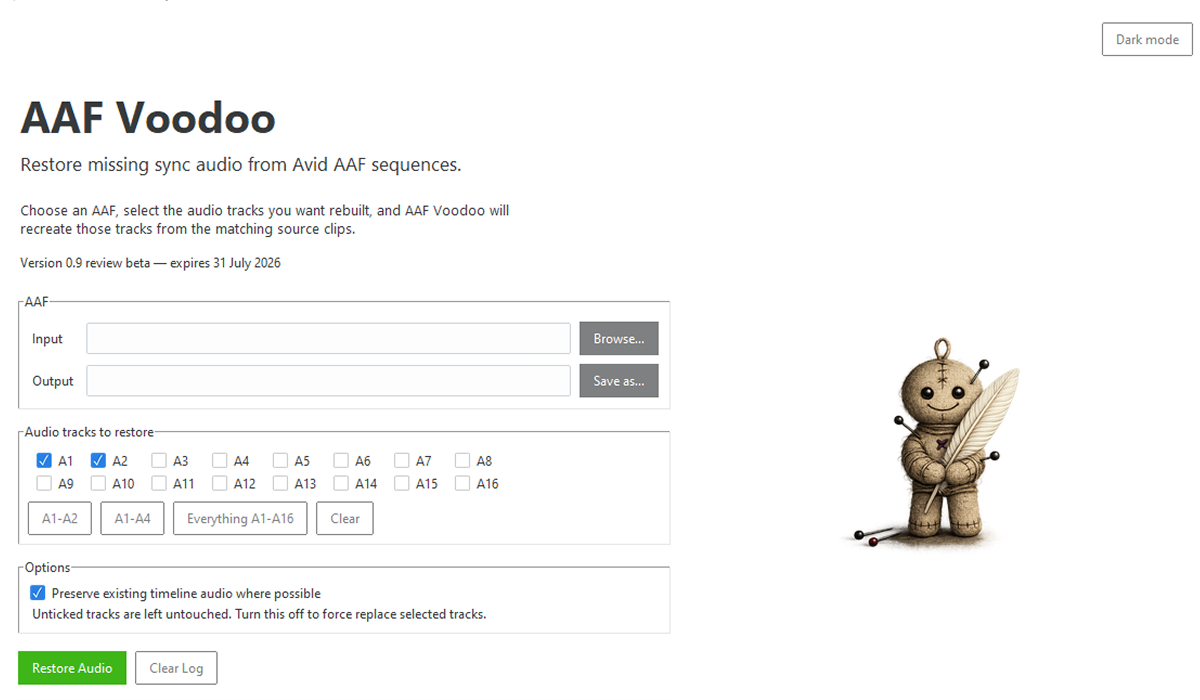
AAF Voodoo reads the picture edits in your AAF, finds matching source audio, and rebuilds selected timeline audio tracks automatically.
Repopulating missing audio tracks by hand can be slow, repetitive and easy to get wrong.
AAF Voodoo helps restore selected audio tracks from the source clips referenced by clips on the timeline.
AAF Voodoo scans the visible clips on V1 in an AAF and rebuilds matching source audio.
Use quick buttons for A1-A2, A1-A4 or A1-A16, and leave unticked tracks untouched.
Preserve existing timeline audio where possible, or deliberately replace selected tracks when needed.
Your files stay on your computer
AAF Voodoo analyses and modifies your AAF locally. Nothing is uploaded and no account is required.
Useful for editors, assistant editors and post teams who need to restore missing sync audio without manually match-framing source clips by hand.
Restore missing audio without rebuilding every edit by hand.
Rebuild A1-A2, A1-A4 or more tracks from picture edits.
Prepare cleaner AAFs before turnovers, dubs or further finishing work.
AAF processing happens locally. Nothing is uploaded.
Latest version
Windows 10 / 11 · 64-bit · Installer included · No Python required
Download AAF Voodoo 0.9 Beta
Windows may show a security warning because this beta installer is not yet digitally signed.
Choose “More info” → “Run anyway” the first time you open AAF Voodoo.
Questions, feedback or bug reports are welcome. Please send details of any AAF files that fail to open, clips that do not restore correctly, or audio that appears out of sync.
[email protected]